
Since v13 shipped the Veeam Software Appliance, I hear the same question in almost every customer meeting. Do we move our existing VBR server onto the appliance, or do we stand up a fresh VSA and walk the workloads over?
Additionally, Andreas Buhlmann wrote an excellent, thorough piece on the three v13.1 deployment paths — upgrade, migration, or greenfield. Before you plan, I recommend reading it alongside guidance for the Veeam Software Appliance: Veeam v13.1 Deployment.
I am not going to repeat it. What I want to do here is narrow the question down to the two VSA-bound options, and give you something you can put on one slide in front of an infrastructure manager who has ten minutes.
Because in the field, the decision almost never turns on the long feature comparison. It turns on three or four specific things in the environment, and once you know those, the answer is usually obvious.
The one rule you cannot break
Before any decision tree, there is a hard sequencing constraint, and it is the single most expensive mistake available to you right now:
Do not upgrade your Windows VBR server to 13.1 if you intend to migrate to the VSA.
The supported Windows-to-Linux platform migration source is 13.0.x only. The sequence is:
- VBR 12.3.x on Windows
- Upgrade to VBR 13.0.x on Windows
- Migrate to VSA 13.0.x — same version on both sides
- Upgrade the VSA to 13.1.x
Having already reached 13.1 on Windows, you may find the migration door closed for now.
You have two options.
Wait for a later v13.x release to reopen the Windows-to-VSA path.
Or start fresh with a Veeam Software Appliance.
Waiting is usually the better option, since you are on a supported, current version.
A future release will almost certainly restore the path.
Do not force a rebuild to reach the appliance a few months earlier.
Check KB4800 before you touch anything, and check it again the week you actually run the project, because it is a living document. Note also that there is no rollback from the appliance back to Windows.
The decision tree
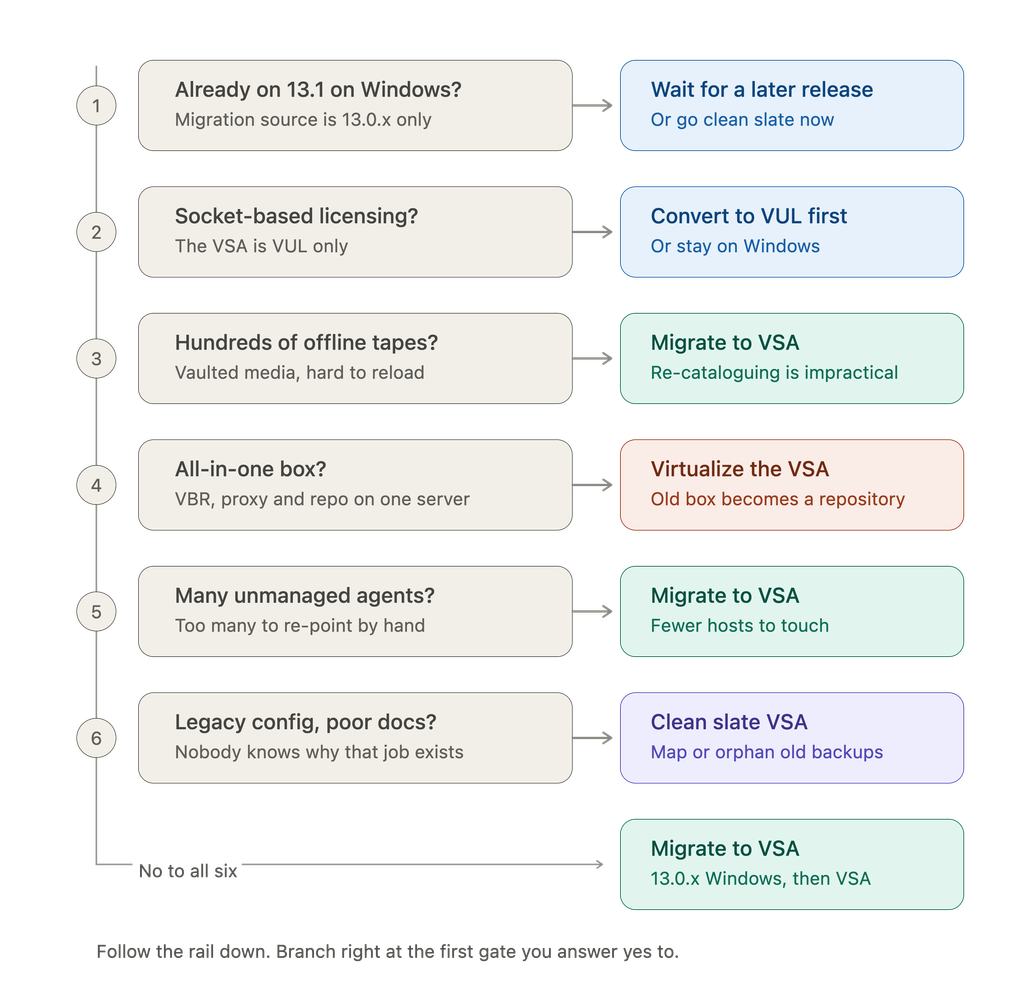
Six gates. That is the whole thing. Now let me explain the ones people underestimate.
Tape: the catalog can be rebuilt, but you may not want to
This is the gate I lead with, and the nuance matters.
The tape media catalog resides in the VBR configuration database.
It is the map between the barcode on a cartridge and the restore points written to it.
A fresh VBR server does not have that map, but it can rebuild it.
You load the tapes, run a catalog operation.
The server reads the media headers back into the database.
This is a supported, normal operation.
So the question is not “can I?” It is “how many cartridges, and where are they?”
- A handful of tapes in the library? Re-cataloging is an afternoon. Go clean slate if the rest of the tree points that way.
- A few dozen, mostly on-site? Annoying, but plannable.
- Hundreds of cartridges sitting in an off-site vault or a safe? This stops being a Veeam task and becomes a logistics project. You are scheduling vault retrievals, loading media in batches through however many drives you have, and doing it under a change window. For the customers I work with here in Saudi Arabia, where retention is often driven by regulator requirements and GFS tape chains run seven years or more, that is a genuinely large number of tapes.
The practical rule: if your offline tape estate runs into the hundreds, migrate. The migration carries the catalog across with the configuration, and your media stays restorable on day one, with no vault retrievals at all.
One caveat that catches everyone, regardless of path: the VSA cannot hold the tape server role. Tape needs privileged access that the hardened appliance deliberately does not grant. So even after you migrate, you need a separate Windows or Linux machine acting as the tape server with the library attached. Plan that box into the design before the migration window, not after. If your library is currently attached directly to the VBR server over SAS, the next step is to take the decision point for an all-in-one.
All-in-one: virtualize the appliance, keep the box as a Repository/Tape Server
If your VBR server is a single physical box running the backup server, the proxy role, and the repository on local disk, you have a bigger problem than a version upgrade. The VSA simply cannot be what that box was — it cannot hold the tape server role, it cannot mount external iSCSI or Fibre Channel storage as backup storage, and its disks cannot be expanded after deployment. The consolidated roles have to come apart.
Furthermore, the idea of an all-in-one server means your actual data lives on disk in a file system format for Windows (Ideally ReFS, not NTFS)
If the environment is genuinely small, a clean rebuild on a modest VSA is fine, and you can move on. (However, ensure your old backup data is shifted for the rebuild and returned back)
For anything larger, the approach I would take is this:
- Deploy the VSA as a virtual machine. Do not try to make the physical box the appliance. Give the backup server its own lightweight VM and stop tying it to storage.
- Keep the old all-in-one server, but demote it to a repository. All that local capacity and all those existing backup chains stay exactly where they are. You are not migrating data and you are not buying storage. and for a true ransomware protection plan ahead for immutable backup data on a repository
That turns an ugly re-platforming problem into a role-separation exercise with the data staying still, which is a much easier change to get approved and a much shorter maintenance window. It also leaves you in a good place for the next step, whenever you decide to move that capacity onto a proper hardened repository or a Veeam Infrastructure Appliance.
Unmanaged agents and plug-ins: count the hosts
Managed agents are easy. VBR knows about them, they come across with the configuration, and you upgrade them from the console.
The awkward category is everything VBR does not push:
- Standalone or unmanaged Veeam Agents on machines you do not control
- Veeam Plug-in for Oracle RMAN
- Veeam Plug-in for SAP HANA and SAP on Oracle
- Veeam Plug-in for IBM Db2
- The Microsoft SQL Server plug-in on DBA-managed instances
Each of these is configured on the protected host, pointing at a specific backup server, with credentials someone else’s team owns. In a clean slate build, somebody has to log into every one of those hosts, re-point it at the new server, re-enter credentials, and validate.
But this is a volume question, not a blocker. If it is a small bunch, and especially if you do not mind taking one active full backup as the new baseline, a fresh deployment is perfectly reasonable — re-point them, let them run a full, and decommission the old Windows box afterwards. Clean and done.
The calculus flips when the list gets long, or when those hosts belong to teams that are not yours. Coordinating twenty DBAs across three change windows is a project schedule, not a task. Count the hosts you would have to touch by hand. If it is more than a dozen, or any of them need someone else’s approval, migrate.
Either way, everything has to reach agent v13 or later, because the VSA does not support older agent versions. “Upgrade the agent” is a much smaller ask than “re-onboard the agent”, but it is not nothing.
While you are counting, also count anything with a local Windows path in it — pre-job and post-job scripts, CSV exports, RMM hooks, notification scripts, anything living in C:\Scripts\. None of that survives the move to a Linux appliance untouched, on either path. Inventory it early; it is always more than people remember.
Legacy configuration: start fresh, it is not close
If the configuration has grown through three or four major versions and nobody can explain half of it, do not migrate it. You would be carrying decisions you do not understand onto a platform you are still learning, and every strange behaviour afterwards becomes a question of “is this the appliance, or is this something we inherited?”
Clean slate is clearly better when:
- Job naming, retention design, SOBR layout, or the security model need rethinking anyway
- Documentation is thin
- There is a parallel project — a new data centre, a storage refresh, a virtualization platform change — that is going to force job rework regardless
- You want a per-workload way back during the transition, which migration does not give you
The objection is always “but what about the existing backups?” You have two perfectly good answers, and neither requires migration.
Map them, using the process below, so the new jobs continue the existing chains. Or leave them orphaned — mount the repository, let the appliance import them, and keep them as read-only restore points until retention ages them out. There is nothing wrong with orphaned backups sitting in a repository. They restore fine. They just do not get new increments. and you would need to get a new full backup.
Clean slate, done properly
If you go this route, you want to keep your existing backup data. Additionally, the sequence is:
- Deploy the clean VSA and connect your backup proxies and managed infrastructure to it.
- Mount your existing backup repository directly to the new VSA.
- Run a rescan on that repository. The VSA discovers the existing backup files and places them under Disk (Imported).
- Recreate the backup jobs manually with identical settings on the new VSA.
- Map the jobs. Before running any new job for the first time, edit the job settings, point it at the repository, and click Map Backup to explicitly bind the job to the imported backup files.
Step five is the one people skip, and skipping it means your first run starts a brand new full backup chain — new storage consumption, broken retention continuity, and a very awkward conversation about capacity. Map first, run second.
If you are moving workload by workload rather than all at once, do it by clean technical boundaries — one vCenter, one cluster, one repository target at a time. Never have two backup servers processing the same VMs in the same window. They do not coordinate snapshots, CBT, or application-aware processing with each other, and the failure modes are ugly. Finish the last restore point on the old job, disable it, then enable the new one.
Quick reference
| What you have | What to do |
|---|---|
| Already on 13.1 on Windows | Wait for a later release, or go clean slate |
| Socket-based licensing | Convert to VUL first, or stay on Windows |
| Hundreds of offline or vaulted tapes | Migrate, and plan a separate tape server |
| A handful of tapes, all on site | Either path — re-cataloguing is manageable |
| All-in-one physical server | VSA as a VM, old box demoted to repository |
| A dozen or more unmanaged agents or plug-ins | Migrate |
| A few agents, and an active full is acceptable | Clean slate, then decommission the old box |
| Legacy configuration nobody understands | Clean slate, map or orphan the old backups |
| Clean, well-documented, VUL-licensed | Migrate — 12.3.x, 13.0.x Windows, VSA 13.0.x, 13.1.x |
Before you book the change window
Whichever path you land on, walk this list first:
- Current build number, not just the version — the supported source builds matter.
- License type. The VSA is VUL only. Socket licenses convert, but that is a commercial conversation with lead time, so start it early.
- Every plug-in and integration, checked individually against v13.1 support on the appliance. Storage snapshot integration support in particular varies by vendor and is still moving.
- Agent inventory with operating system versions. Anything that cannot run a v13 agent is a blocker you want to find now.
- Tape design, including where the tape server will live.
- Local scripts and file paths on the current Windows server.
- Ports and firewall rules. There are a lot of changes in v13 — well over two hundred. In a regulated environment with a separate network team, this is often the long lead item.
- Configuration backup, taken and verified, plus a written rollback plan.
- A restore test before and after. Not a job success, an actual restore.
Closing thought
The appliance is the right direction of travel. Less Windows in the backup core, a hardened platform, an integrated update mechanism, and appliance-only features like HA and the Security Officer role are genuinely worth having.
But the path there is not a feature decision, it is an inventory decision. Migrate when your environment holds state that is expensive to rebuild — large offline tape estates, plug-in relationships spread across teams you do not control. Start fresh when the thing you would be carrying over is mostly technical debt, and map the old chains so you keep the data without keeping the mess.
And if you are all-in-one, virtualize the appliance and let the old box earn its retirement as a repository.
References
Leave a Reply